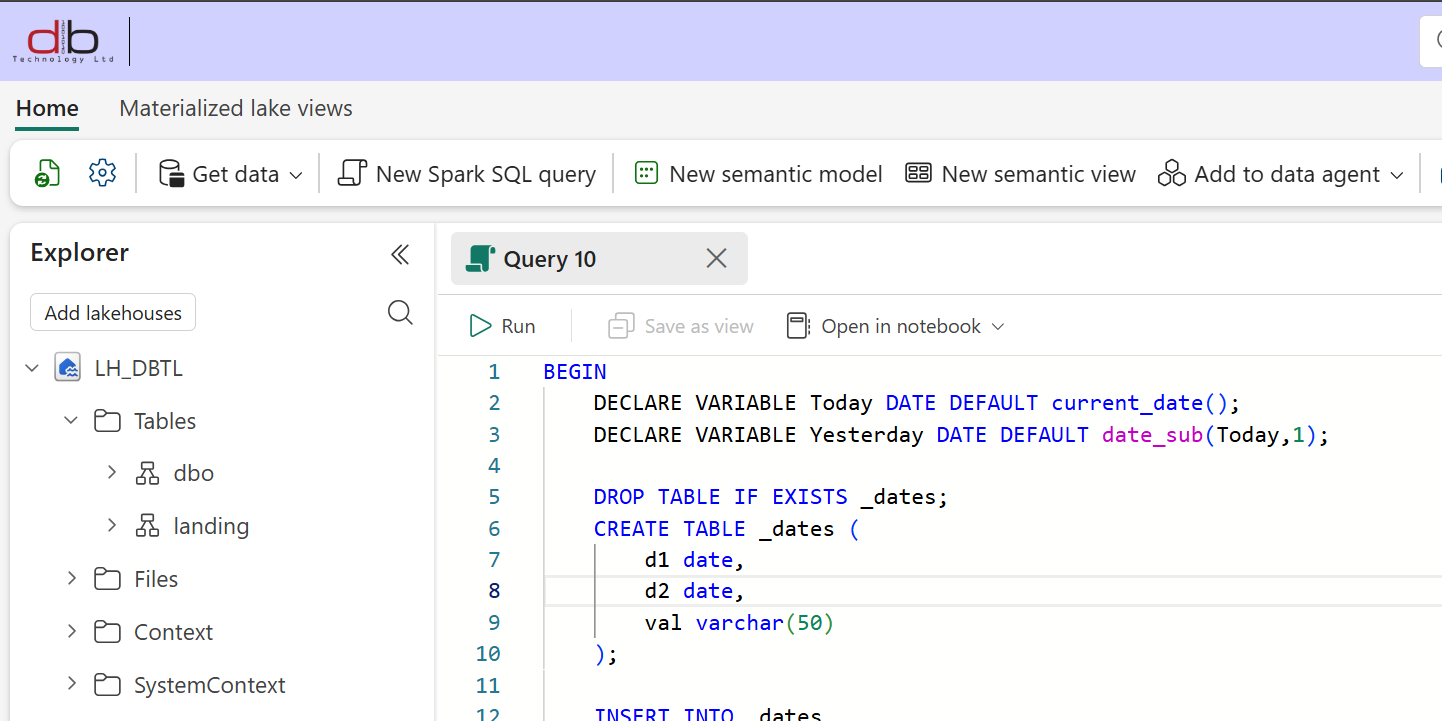
Fabric lakehouse -> Lakehouse Query Explorer -> New Spark SQL Query
Fabric has a new Spark query method
Microsoft Fabric offers multiple great options for automated ETL/ELT, but its traditional methods are overkill for something basic like setting up and populating a few static tables, particularly for a test system. Thankfully Microsoft have recognised this and introduced access to the Spark Query engine directly through the Fabric UI, allowing developers to execute DDL and DML Spark SQL queries against a Lakehouse without a requirment for notebooks, pipelines, dataflows, or other stored Fabric artefacts.
Why I wrote this?
For a recent article, I was contemplating the best way to generate and populate a demo table with a small set of values in a Fabric Lakehouse. That article compares a common data cleansing technique with reference to SQL Server and Fabric Lakehouses. I created my table in SQL Server and the the script to perform the cleanse, but then I wanted the same table in a Fabric Lakehouse, so I could demonstrate the technique in a notebook or Spark SQL. Whilst the process is relatively straight forward in both system, creating a table and populating it in a lahehouse isn’t wasn’t.
I quickly generated a table in SQL Server and used a Table Value Constructor to populate it, then I wrote a few queries to demonstrate the point I was hoping to put across. Then I wrote some text about PySpark and notebooks, but I wanted to demonstrate rather than just talk about it, so I wanted to make the same table in a Lakehouse and populate it. I thought about copying and pasting the SQL table to a csv and then importing it into Fabric, which would have worked, but then I started thinking of the alternative methods of getting data into Fabric, Python notebook with some Spark.SQL or magic SQL , promotion of a flat file from the Files section, ingestion using dataflow Gen2, Copy Data activity in a Pipeline, or even a Copy Job). All of these methods generate stored artefacts, which is great for a repeatable pocess bt ot for a one-off.
SQL Query Editor
In October 2026, Microsoft introduced the SQL Query Editor to Fabric, but they apear to have left documentation to Spark. Microsoft’s document is here.
Query data with the Lakehouse query explorer – Microsoft Fabric | Microsoft Learn
The button for this is in the Lakehouse Query Explorer, which is the Lakehouse view you normally go into when not using the SQL Analytics Endpoint. They have replaced the old button menu for adding a notebook from within the lakehouse, with a new one called New Spark SQL Query. Microsoft promote this feature as a place to quickly query objects in the lakehouse, but it is so much more than that.
“You can write and run Spark SQL queries against your lakehouse data without leaving the explorer. You don’t need to switch to the SQL analytics endpoint or create a notebook for quick data exploration.”
These queries use the Livy API , and they can therefore run both DDL and DML queries!
Before we continue, a very important notice!
Tabs aren’t persistent across sessions.
If you close or navigate away from the lakehouse, you lose all open tabs and their query content.
With that small but hugely important caveat out of the way, you may wonder what the point of these are.
For a separate post about NULL handling, I wanted an identical table in both a Fabric Lakehouse and a SQL Server containing just 6 rows, with each row sowing a different state, so I could query the table repeatedly, using it as test data. Pretty standard stuff.
The simple table called _dates, contains two date columns and a text column. I needed a script to generate the table schema and inject some default data . In SQL this is pretty simple using a Table Value Constructor.
SQL Server version
DECLARE @Today date = GETDATE()
DECLARE @Yesterday date = GETDATE()-1

DROP TABLE IF EXISTS _dates
CREATE TABLE _dates (
	d1 date,
	d2 date,
	val varchar(50)
)

INSERT INTO _dates
SELECT *
FROM ( VALUES
	(null,null,'null, null'),
	(@Today,null,'date, null'),
	(null,@Today,'null, date'),
	(@Yesterday,@Today,'date < date'),
	(@Today,@Yesterday,'date > date'),
	(@Today,@Today,'date = date')
) as v(d1,d2,val)

SELECT * FROM _dates
Unlike the old Lakehouse Explorer, the SQL Analytics Endpoint, or a connection using a third party app, the New Spark Query Editor can perform all types of spark sql queries including create, insert, update, delete and drop, but the Microsoft document doesn’t go into anywhere near enough detail to explain this, so I will.
Spark SQL is a little bit different to T-SQL though.
Spark SQL version
BEGIN
    DECLARE VARIABLE Today DATE DEFAULT current_date();
    DECLARE VARIABLE Yesterday DATE DEFAULT date_sub(Today,1);

    DROP TABLE IF EXISTS _dates;
    CREATE TABLE _dates (
	    d1 date,
	    d2 date,
	    val varchar(50)
    );

    INSERT INTO _dates
    SELECT *
    FROM VALUES
        (NULL,NULL,'null, null'),
        (Today,NULL,'date, null'),
        (NULL,Today,'null, date'),
        (Yesterday,Today,'date < date'),
        (Today,Yesterday,'date > date'),
        (Today,Today,'date = date')
    AS v(d1,d2,val);

    SELECT * FROM _dates
END;
Key differences
One command
The endpoint sends the entire script to the server, which will interpret it as a single statement. If you send multiple statements, you will get a syntax error, however, you can overcome this limitation by sending a batch within compound statement markers; BEGIN and END.
Without the compound statement markers, you will only be able to issue one single command, just like Microsoft show in their documentation. Any more and the server will not be able to parse it and you’ll get a syntax error. This is not mentioned in the MS document.
Begin and End therefore provide scope for everything inside them, which runs as a set, just like a sql query block in SQL Server.
Variable Declaration
The differences are:
- Spark SQL defines variable using the DECLARE VARIABLE Keyword, but T-SQL only uses DECLARE
- GETDATE() is a SQL function so does’t exist in Spark, which has and equivalent internal function current_date()
- Declarations must be first in Spark, but sql allows them anywhere, as long as you don’t reference them before you declare them.
T-SQL: DECLARE @Today date = GETDATE()
Spark SQL: DECLARE VARIABLE Today DATE DEFAULT current_date();
Everything else in this set of commands is the same. This is so much better thanthe old way.
Conclusion
For me, the real value of the New Spark Query is not that it introduces another way to write SQL, but that it provides a lightweight way to work with Lakehouse data using the Spark engine. The ability to create and populate tables without generating additional Fabric artefacts, coupled with direct write access that was previously unavailable through the SQL Analytics Endpoint, makes this a capability I expect to use regularly going forward.
For more detailed information on the feature, from an Apache perspective (the creators of Spark), see the Apache Spark documentation.